
Multi-Column ComboBox
a dotNet user control
Framework version: 3.5
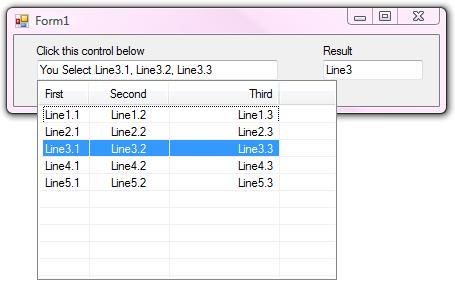
Download dll with demo written in VB.Net.
Source code written in VB.Net.
Software and code is provided with MIT license.
a dotNet user control
Framework version: 3.5
Download dll with demo written in VB.Net.
Source code written in VB.Net.
Software and code is provided with MIT license.
Hello!
Is it possible to leave MultiColumnComboBox readonly = false? I use a database and as per the digit I would like to filter the results. I could also use a textbox to do the searches but would have to expand the MultiColumnComboBox automatically. Is it possible to do that?
I guess I will release this control to github with MIT license in few days. You may check it later here. Lol
Maybe it's possible to email me? I need a lot in my software and found it very good, except for those issues.
You will get the notification.
Okay, so I'll wait, thank you!
But just one thing, is it possible to expand Dropdown by code, without having to click the MultiColumnComboBox?
Thank you very much in advance.
I found the code is too old to match the standard set from myself in Github. I publish the source code here. You can download and change it as your own wish.
Software and code is provided with MIT license.
Okay, I'll wait, thank you!
It is released. Check the end of the original post.