Archive: 2014

SharePoint1 min read

August 2014 Patches of SharePoint 2014: Microsoft Server Proof Issue

Microsoft pushed SharePoint 2014 August 2014 patches through WSUS. After install these patches on servers within farm, you will need to rerun the wizard of SharePoint to upgrade all instances.

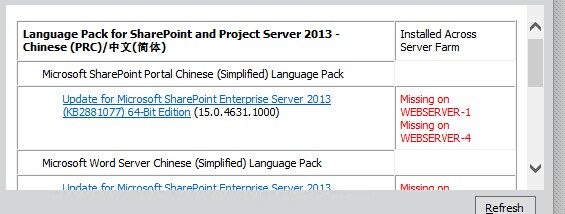
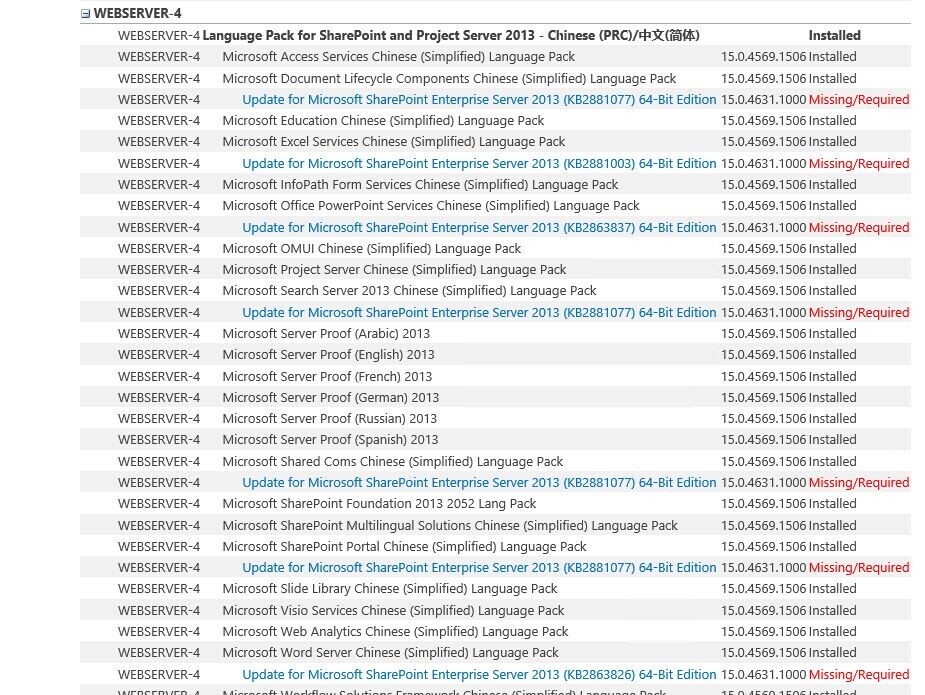
One error on my scenario is related to Microsoft Server Proof. Wizard reports patches for this component are missing on all servers except the server which running the wizard.

That's the problem related to configuration database. To fix this, you just need to run Get-SPProduct -local on all servers.

Apple Stuff1 min read

Solved: Handoff problem with iOS 8 and OSX 10.10

As a developer, I've tested OSX 10.10 (Yosemite) and iOS 8 for a long time. There was a strange issue after I reset my OSX:

When I try to make a call from OSX, the calling box will be closed after 10 sec without any information in OSX 10.10 DP4. In DP5, it will say that "Your iPhone is not configu...". Also, no SMS can be sent from OSX either. But when typing message on iOS, there will be an icon displayed on the left side of Dock in OSX.

Finally, I know the reason.

We know that the account name is one email address. And you can add more email addresses as alias. The problem of the current version of iOS 8 and OSX 10.10 is: if you used the email address for Facetime and iMessage is different from the one used in iCloud for OSX, no matter these email addresses are linked to the same iCloud account or not, the handoff function won't work, just like the situation I mentioned above.

Before Apple fix this bug, we have to use the same email address for these place.

This issue is submitted to Apple.

Gossip1 min read

Server changed again

Due to too many timeout issues and errors, I have to change this site from Windows IIS to Ubuntu LAMP.

PHP on Windows is really painful.

dotNet Product1 min read

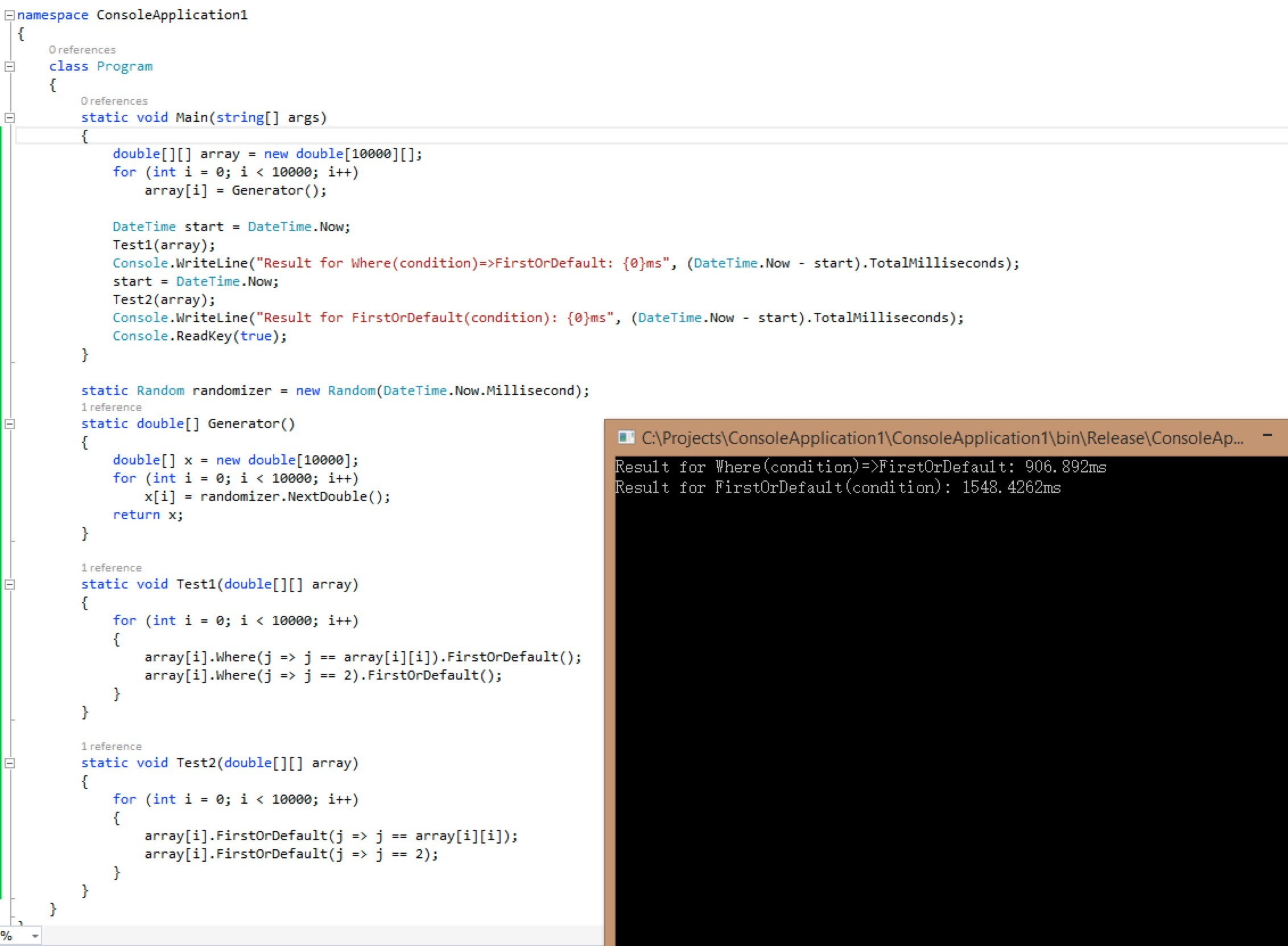
Solved: Why Linq Where.FirstOrDefault is faster than use FirstOrDefault with condition on an array?

Hi all.


Why applying ".Where(condition).FirstOrDefault()" is much faster than ".FirstOrDefault(condition) when it's applied on an array?


Answer: While calling method Where() on an Array or a List, it's optimized to use the enumerator of the source directly. But FirstOrDefault(), which doesn't have this mechanism, runs the virtual method version from IEnumerator.GetEnumerator().

Special thanks to Iris Sakura.

SharePoint1 min read

DANGER: Don't install July updates for SharePoint 2013 if you have installed a language pack

These updates really suck.


I've managed to install these updates last time by re-install OS and SharePoint on failed servers. After that, some colleague request to install a language pack. It still works at that time.


Today, these 4 updates are visible again on Windows Update. They all can be update successfully. But when I run the wizard, it shows

.


In CA, I see


It's ok on some servers but failed on others. The patch of language pack may be not included. When I try to run that updates manually, it says it cannot applied again.

It can be fixed by removing the language pack and rerun wizard on all servers.


Do Microsoft have a test division and process for release management?


SharePoint1 min read

Error "Host Already Presented" shown while running Add-SPDistributedCacheServiceInstance

Special thanks to Iris Sakura.


Problem: If you remove one SharePoint server from Central Administration site, some information will be left in farm database. While adding a server with the same name back to farm, the Distributed Cache service may not able to start.

Fix: On the new installed server

  1. Open C:\Program Files\AppFabric 1.1 for Windows Server\DistributedCacheService.exe.config with a notepad or other text editor with administrator permission.
  2. Nav to configuration - dataCacheConfig - clusterConfig, remember the provider and connectionString.
  3. Start PowerShell.
  4. Run Add-CacheHost -ProviderType xxx -ConnectionString yyy
    xxx is the provider gotten from step 2 and yyy is connectionString.
  5. Run Unregister-CacheHost
  6. Run Remove-CacheHost

You are ready to re-run the Add-SPDistributedCacheServiceInstance now.

SharePoint1 min read

DANGER: July 2014 update for SharePoint Server 2013

There is a big farm of SharePoint Server 2013 in my company. Most of these servers are prepared with SharePoint 2013 and upgraded to Service Pack 1. Some new servers are prepared with SharePoint 2013 with Service Pack 1 directly. Project Server are installed in all servers.

From WSUS, Microsoft pushed July 2014 update for SharePoint 2013 this month, which includes KB2881077, KB 2863837, KB2863826 and KB2881003.

The problem is these can be applied on all servers come with SharePoint 2013 with Service Pack 1 but failed to be done on all servers which were upgraded to Service Pack 1. Patch files are trying to uninstall Service Pack 1 on those servers but Service Pack 1 is marked not able to be removed.


The way to fix is:

  1. Remove all servers which were upgraded to Service Pack 1 separately from Central Administration site. You cannot do that by wizard -- it won't let you do that due to patch incomplete.
  2. Reinstall the whole operation system to that servers removed from step 1.
  3. Install SharePoint 2013 with Service Pack 1 and all other related tools to those servers.
  4. Upgrade all servers to July 2014 update.
  5. Run wizard on all servers.
  6. Add those servers back to farm.
  7. You may need to fix the distributed cache problem by following this guide from Microsoft. If you get the error "Host Already Presented", you may want to have a look at this post.


WTF Microsoft!