
chattr
This command can be used to lock a file.
usage: chattr +i filename
The files locked by chattr cannot be modified or deleted, even with root permission.
For unlocking, use chattr -i filename.
chattr
This command can be used to lock a file.
usage: chattr +i filename
The files locked by chattr cannot be modified or deleted, even with root permission.
For unlocking, use chattr -i filename.
Apple Stuff1 min read
After removing and re-installing some software, there may be some of obsoleted or duplicated item in osx "Open With" menu of right-click mouse menu. In that case, you need to run this code in terminal to rebuild that menu.
/System/Library/Frameworks/CoreServices.framework/Versions/A/Frameworks/LaunchServices.framework/Versions/A/Support/lsregister -kill -r -domain local -domain user; killall Finder
As you seen, after rebuild menu, Finder will be killed and restart also.
Alternatively, you may want to save that code as a shortcut by this:
alais FixOpenWithMenu = '/System/Library/Frameworks/CoreServices.framework/Versions/A/Frameworks/LaunchServices.framework/Versions/A/Support/lsregister -kill -r -domain local -domain user; killall Finder'After doing that, you will only need to type FixOpenWithMenu in terminal window instead of that long command.
Microsoft dotNetWindows1 min read
We know that from Windows Vista, the original optical media is useless after you finish system installation. Enabling a role of feature do not require that media any more.
But in Windows 8 / Windows Server 2012, for some reason we don't know, the situation is changed a little. The setup package of dotNet framework 3.5 is not pre-copied to your hard drive. It will have to be downloaded from Microsoft while enabling that feature.
If you hate this, luckily, that setup package is on installation media also. We just need to tell the system to use that instead of downloading.
You may want to run this as administrator:
DISM /Online /Enable-Feature /FeatureName:NetFx3 /All /LimitAccess /Source:d:\sources\sxs
where:
Source: http://msdn.microsoft.com/en-us/library/hh506443.aspx
Windows1 min read
Windows 8 / Windows Server 2012 have changed a lot of UI. The old way for installing a dedicated language pack (lp.cab) does not work any more.
To do the same thing as before, you may love this: \Windows\system32\lpksetup.exe
Source: http://social.technet.microsoft.com/Forums/en-US/w8itproinstall/thread/ef9eada9-2abe-4d3e-8b8f-f66da098e651
dotNet Product1 min read
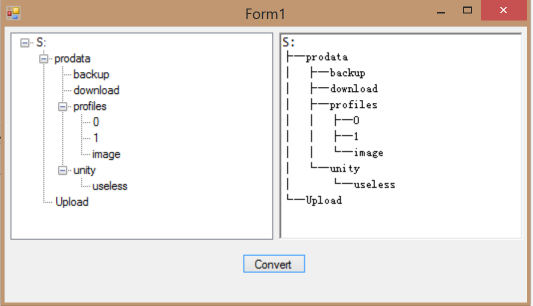
using System;
using System.Collections.Generic;
using System.Linq;
using System.Text;
using System.Windows.Forms;

namespace TreeToText
{
    class TreeToText
    {
        const string LineMid = "├─";
        const string LineLast = "└─";
        const string Line = "│  ";
        const string Space = "    ";

        /// <summary>
        /// Convert a tree node to text
        /// </summary>
        /// <param name="node">Root node to convert</param>
        /// <returns>Text</returns>
        public static string Tree2Text(TreeNode node)
        {
            if (node == null) return null;
            StringBuilder builder = new StringBuilder();
            builder.AppendLine(TreeNodeText(node));
            Tree2Text(builder, node, "");
            return builder.ToString();
        }

        static string TreeNodeText(TreeNode node)
        {
            return node.Text;
        }

        static void Tree2Text(StringBuilder builder, TreeNode parent, string prefix)
        {
            int nodesCount = parent.Nodes.Count;
            if (nodesCount == 0) return;
            int nodeMaxIndex = nodesCount - 1;
            for (int i = 0; i < nodesCount; i++)
            {
                builder.Append(prefix);
                TreeNode node = parent.Nodes[i];
                if (i != nodeMaxIndex)
                {
                    builder.Append(LineMid);
                    builder.AppendLine(TreeNodeText(node));
                    Tree2Text(builder, node, prefix + Line);
                }
                else
                {
                    builder.Append(LineLast);
                    builder.AppendLine(TreeNodeText(node));
                    Tree2Text(builder, node, prefix + Space);
                }
            }
        }
    }
}
VMWare vSpheredotNet Product1 min read
A small tool for deploying VMware ESXi from another computer running with Microsoft Windows.
DotNet framework runtime 4.o is required.
Freeware.
Windows1 min read
In many instance of Window Server 2012, there are lots of errors in Event Log about Volume Shadow Copy Service like this:
Volume Shadow Copy Service error: Error creating the Shadow Copy Provider COM class with CLSID {463948d2-035d-4d1d-9bfc-473fece07dab} [0x80070005, Access is denied.].
Operation:
Creating instance of hardware provider
Obtain a callable interface for this provider
List interfaces for all providers supporting this context
Query Shadow Copies
Context:
Provider ID: {3f900f90-00e9-440e-873a-96ca5eb079e5}
Provider ID: {3f900f90-00e9-440e-873a-96ca5eb079e5}
Class ID: {463948d2-035d-4d1d-9bfc-473fece07dab}
Snapshot Context: -1
Snapshot Context: -1
Execution Context: Coordinator
Actually, that may be a bug of Windows Server 2012. You need to and are able to correct it manually by setting up the right credential for related DCOM. You can choose UI or PS to reach that:
UI mode:
1 Open Component Services, open Computers - My Computer - DCOM Config.
2 Locate WTVdsProv and press right mouse key - Properties - Identity, select This user, enter an account name and password with local administrator’s permission.
3 Do the same step for WTSnapshotProvider.
PS mode:
Open PowerShell and use these commands:
$PsCred = Get-Credential
$PrvdIdentityPath = New-Object System.Management.ManagementPath("root\wmi:WT_iSCSIStorageProviderIdentity")
$PrvdIdentityClass = New-Object System.Management.ManagementClass($PrvdIdentityPath)
$PrvdIdentityClass.SetProviderIdentity("{88155B26-CE61-42FB-AF31-E024897ADEBF}",$PsCred.UserName,$PsCred.GetNetworkCredential().Password)
$PrvdIdentityClass.SetProviderIdentity("{9D884A48-0FB0-4833-AB70-A19405D58616}",$PsCred.UserName,$PsCred.GetNetworkCredential().Password)
Source: http://blogs.technet.com/b/filecab/archive/2012/10/08/iscsi-target-storage-vds-vss-provider.aspx